Introduction
The Strategy Pattern is a behavioral design pattern that allows you to define a family of algorithms, encapsulate each one, and make them interchangeable.
In simpler words: instead of writing if-else or switch statements to select a behavior, you can swap the behavior dynamically at runtime without touching the client code.
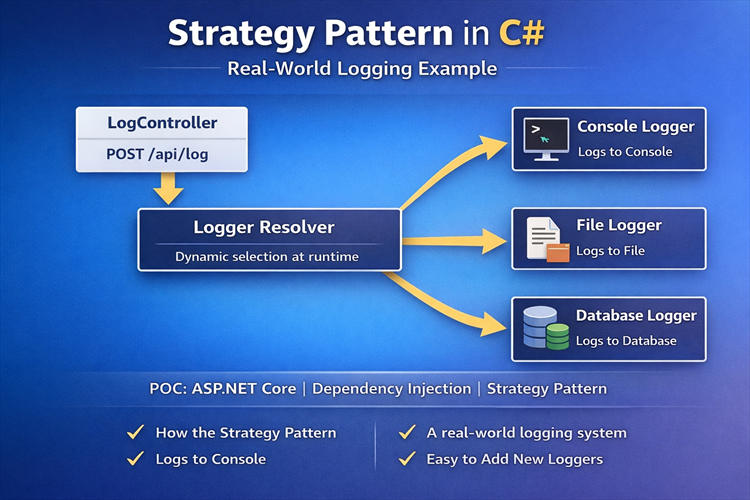
This blog demonstrates a real-world example of the Strategy Pattern in C# / ASP.NET Core, using a logging system. We will dynamically choose between Console, File, and Database logging strategies via a web API.
By the end of this tutorial, you’ll see how to:
-
Use Strategy Pattern to decouple logging logic
-
Dynamically select a logging strategy at runtime
-
Build a scalable, maintainable backend API
When to Use the Strategy Pattern
The Strategy Pattern is useful in situations where behavior varies dynamically. Some common use cases include:
-
Logging: Console, File, Database, Email
-
Payment processing: Stripe, PayPal, Razorpay
-
File export: CSV, TXT, JSON, PDF
-
Sorting / Filtering: Dashboards and reports
-
Authentication / Authorization: Multiple providers or methods
In our POC, we focus on logging, which is a universal requirement in almost all backend systems.
Step 1: Define the Strategy Interface
The first step is to create a common interface for all logging strategies:namespace StrategyPattern.API.Strategies;
public interface ILoggerStrategyServcie{ public string Name { get; } public Task LogAsync(string message);}
-
Nameidentifies the strategy (used for runtime selection) -
LogAsyncdefines the logging behavior (async-friendly for real-world use)
Step 2: Implement Concrete Logging Strategies
Console Logger
public class ConsoleLoggerService : ILoggerStrategyServcie{ public string Name => "console";
public Task LogAsync(string message) { if (string.IsNullOrEmpty(message)) throw new ArgumentNullException(nameof(message));
Console.WriteLine($"[{DateTime.UtcNow}]{message}"); return Task.CompletedTask; }}
File Logger
public class FileLoggerService : ILoggerStrategyServcie{ public string Name => "file"; private readonly string _filePath = "logs.txt";
public Task LogAsync(string message) { if (string.IsNullOrEmpty(message)) throw new ArgumentNullException(nameof(message)); File.AppendAllText(_filePath, $"[{DateTime.UtcNow}] {message}" + Environment.NewLine); return Task.CompletedTask; }}
Database Logger (Simulated)
In production, DatabaseLoggerService would save logs to a database using EF Core or ADO.NET.
public class DatabaseLoggerService : ILoggerStrategyServcie{ public string Name => "db";
public Task LogAsync(string message) { if (string.IsNullOrEmpty(message)) throw new ArgumentNullException(nameof(message)); Console.WriteLine($"[DB][{DateTime.UtcNow}] {message}"); return Task.CompletedTask; }}
Step 3: Create the Logger Resolver (Factory)
The Logger Resolver dynamically selects a logger based on a string key:
public class LoggerResolver{ private readonly IEnumerable<ILoggerStrategyServcie> _loggers;
public LoggerResolver(IEnumerable<ILoggerStrategyServcie> loggers) { _loggers = loggers ?? throw new ArgumentNullException(nameof(loggers)); }
public ILoggerStrategyServcie Resolve(string name) { var logger = _loggers.FirstOrDefault(l => l.Name.Equals(name, StringComparison.OrdinalIgnoreCase)); return logger ?? throw new NotSupportedException($"Logger '{name}' not supported"); }}
Step 4: Create the Web API Controller[Route("api/[controller]")][ApiController]public class LogController : ControllerBase{ private readonly LoggerResolver _resolver;
public LogController(LoggerResolver resolver) { _resolver = resolver; }
[HttpPost] public async Task<IActionResult> Log(string message, string logger) { var strategy = _resolver.Resolve(logger); await strategy.LogAsync(message); return Ok("Logged successfully"); }}
Step 5: Configure Dependency Injection and Swagger
var builder = WebApplication.CreateBuilder(args);
builder.Services.AddControllers();
// Register logging strategiesbuilder.Services.AddTransient<ILoggerStrategyServcie, ConsoleLoggerService>();builder.Services.AddTransient<ILoggerStrategyServcie, FileLoggerService>();builder.Services.AddTransient<ILoggerStrategyServcie, DatabaseLoggerService>();
// Register the resolverbuilder.Services.AddSingleton<LoggerResolver>();
// Swaggerbuilder.Services.AddEndpointsApiExplorer();builder.Services.AddSwaggerGen();
var app = builder.Build();
if (app.Environment.IsDevelopment()){ app.UseSwagger(); app.UseSwaggerUI(c => c.SwaggerEndpoint("/swagger/v1/swagger.json", "Strategy Pattern Logging API V1") );}
app.UseHttpsRedirection();app.UseAuthorization();app.MapControllers();app.Run();
Step 6: Test the Logging API
POST /api/log?logger=console&message=HelloWorld
POST /api/log?logger=file&message=File log test
POST /api/log?logger=db&message=Database log test
Why This is a Real-World Design
-
Open/Closed Principle: Add new logging strategies without changing controller or resolver
-
Dependency Injection: Decouples logger creation from usage
-
Runtime Strategy Selection: Easily switch loggers dynamically
-
Extensible: Add EmailLogger, CloudLogger, or third-party logging in minutes
Future Enhancements
-
Add
LogEntrywithLogLevel,Source,CorrelationIdfor structured logging -
Integrate real database logging (EF Core or ADO.NET)
-
Add async file or cloud logging
-
Include fallback strategies if a logger fails
Conclusion
The Strategy Pattern is a powerful tool for dynamic behavior selection in real-world apps.
This POC demonstrates:
-
How to structure logging with multiple strategies
-
How to make your code clean, scalable, and maintainable
-
How to apply design patterns in a web API context
By using Strategy Pattern, you no longer need messy if-else chains, and adding new loggers is trivial — perfect for enterprise systems.
GitHub Repository
I’ve shared this code in a GitHub repo:
Repo name and Link: StrategyPatternLogging
Writer: Ravinder Singh
Full Stack Developer
I have 15+ years of experience in commercial software development. I write this blog as a kind of knowledge base for myself. When I read about something interesting or learn anything I will write about it. I think when writing about a topic you concentrate more and therefore have better study results. The second reason why I write this blog is, that I love teaching and I hope that people find their way on here and can benefit from my content.